Turn a recording into text without uploading it
Drop an audio or video file into Tinta Voice. Your Mac transcribes the speech, and you save the result as TXT, Markdown, or SRT. Find a quote in an interview, read through a lecture, or prepare subtitles for your editor.
Full features for 3 days. No account or card. Apple Silicon Mac, macOS 14 or later.
From a file to a transcript
1. Add your recording
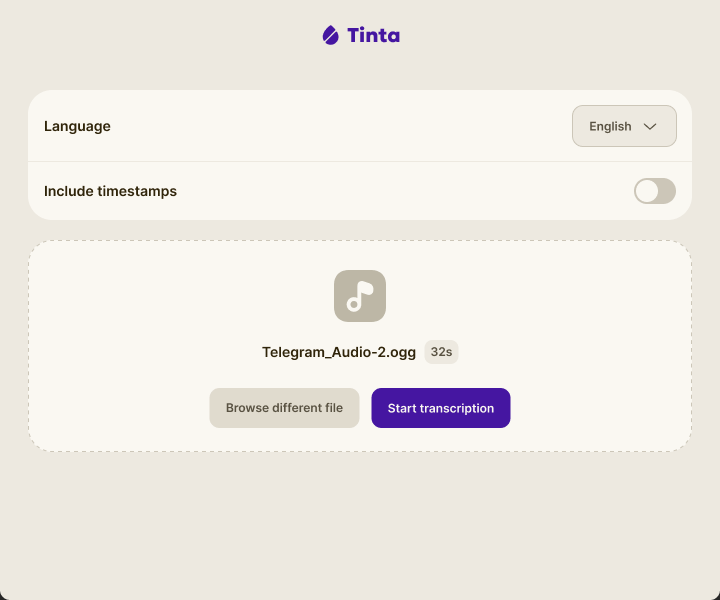
Open Tinta Voice and drop in an audio or video file from your Mac. Choose the spoken language, or use automatic detection.
2. Transcribe locally
Choose whether to include timestamps, then start transcription. The speech model runs on your Mac; the recording is not sent to a transcription service.
3. Review and export
Save the format you need. Check names, numbers, and quotes before using the transcript. Speech recognition can make mistakes, especially with background noise or overlapping voices.
Save text you can work with
TXT for plain text
Open the transcript in a text editor, search it for a quote, or copy a passage into your notes.
Markdown for your notes
Keep the transcript in a Markdown workspace. Optional timestamps help you return to the recording when you need context.
SRT for subtitles
Import the subtitle file into a compatible video editor. Review the wording and timing before publishing.
The same app handles dictation
When you have something to say instead of a file to transcribe, hold a hotkey and speak. Tinta inserts the text where you are writing, or shows a copy card if the app blocks insertion. See Mac dictation or compare Tinta with Wispr Flow.
Before you try it
Does my audio leave my Mac?
Tinta does not upload your recording or transcript to a cloud transcription service. Speech recognition runs locally. Model downloads, license activation, and license checks still need an internet connection.
Can I use Tinta without internet?
Internet is needed to download the speech model and activate a purchased license. Speech recognition then runs locally. In the current release, a paid license also needs an online check at least once every 30 days.
Which languages can I transcribe?
You can select Chinese, Danish, Dutch, English, French, German, Italian, Japanese, Korean, Norwegian, Polish, Portuguese, Russian, Spanish, Swedish, and Turkish. Automatic detection is also available. The app interface is in English. Test your own recordings during the trial to check accuracy.
Does it identify speakers or write a meeting summary?
No. Tinta Voice produces a transcript with optional timestamps. It does not label speakers, join calls, or turn a conversation into a meeting summary.
Can I paste a video link?
The file workflow takes an audio or video file already on your Mac. It does not download a recording from a website link.
How long does transcription take?
It depends on the recording and your Mac. Try a representative file during the free trial to judge both speed and accuracy for your work.
What does the license cover?
The current launch price is $19.99 once, including dictation, file transcription, and future Tinta Voice updates. There is no per-minute transcription fee. You can request a refund within 14 days through the link in your Lemon Squeezy receipt.
Try a recording you already have
Download Tinta, transcribe the file, and check the result in the format you need. The 3-day trial includes the full file transcription workflow.